
MyHealth lets you see some of your Island Health health information online. It may not show your full health record.
What do you need help with?
- My account
- Appointments
- Test results
- Clinical records
- Privacy and security
-
My account
- I need to create a MyHealth account
-
-
You can enroll if you’ve received care at an Island Health location and have your own email address. Adults aged 19 or older can enroll online, by phone or in person.
[Enroll in MyHealth] for instructions.
-
- I already have a MyHealth account. Do I need a BC Services Card account?
-
No. You can sign-in to MyHealth directly
- I can’t set up a BC Services Card account. Where can I get help?
-
Visit the BC Services Card website. or call 1-888-356-2741, Monday to Friday, 7:30 a.m. to 5 p.m.
- I got an error while enrolling. What should I do?
-
Online enrollment is for people aged 19 or older. You may also get an error if the information you entered doesn’t match the information on your record. Check your details and try again.If you still can’t enroll, call the MyHealth Virtual Enrollment Line at 1-844-844-2219,
- Can someone else and I use the same email address?
-
No. Each person needs their own email address to enroll. If you want to see someone else’s MyHealth information, [request access to their account].
- I haven’t received my invitation email. What should I do?
-
Check your junk or spam folder. If the email hasn’t arrived within 24 hours of enrolling, call the MyHealth Help Desk at t 1-800-249-1024. It’s open 24 hours a day, 7 days a week.
-
- My personal information is wrong in my account and I need to fix it.
-
Ask a Registration Clerk to update your information the next time you visit an Island Health location.
- I need to cancel a MyHealth account
-
To cancel your MyHealth account, call the MyHealth Help Desk at 1-800-249-1024 (toll free) which is available 24 hours a day, 365 days a year.
- I think someone has accessed my account
-
If you think someone has used your account, your password has been shared or stolen, or you see information that isn’t yours, call the MyHealth Help Desk as soon as possible. Call toll-free: 1-800-249-1024
- I need access to someone's MyHealth account
-
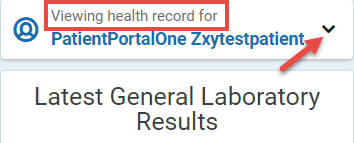
- How do I know whose record I’m viewing?
-
Check the Viewing health record for box. It shows whose record is open.
- Someone I had access to is missing from my account
-
Access ends automatically when a child turns 12, a person turns 19, or the person dies. Proxy access for people aged 12 to 18 must be renewed every year.
If none of these apply, call the MyHealth Help Desk at 1-800-249-1024.
- How do I see someone else's MyHealth account?
-
- Complete the Request for Proxy Removal from a MyHealth Account form. Send the completed form to Island Health using any of the following methods:
- Email myhealth@islandhealth.ca
- Mail to Health Records Department, Victoria General Hospital, 1 Hospital Way, Victoria BC, V9Z 6R5
- Drop-off at any Island Health Hospital Main Admitting Desk
- Complete the Request for Proxy Removal from a MyHealth Account form. Send the completed form to Island Health using any of the following methods:
- I want to remove someone’s access to my account
-
Complete the [Request for Proxy Removal from a MyHealth Account form]. You can email it to MyHealth@islandhealth.ca, mail it to Health Records at Victoria General Hospital, or drop it off at the main admitting desk at any Island Health hospital.
- I can’t sign in or reset my password
-
To reset your password, choose Forgot Password on the MyHealth sign-in page and follow the instructions.If you still can’t sign in or use your account, call the MyHealth Help Desk. It is available 24 hours a day, 7 days a week.Call toll-free: 1-800-249-1024
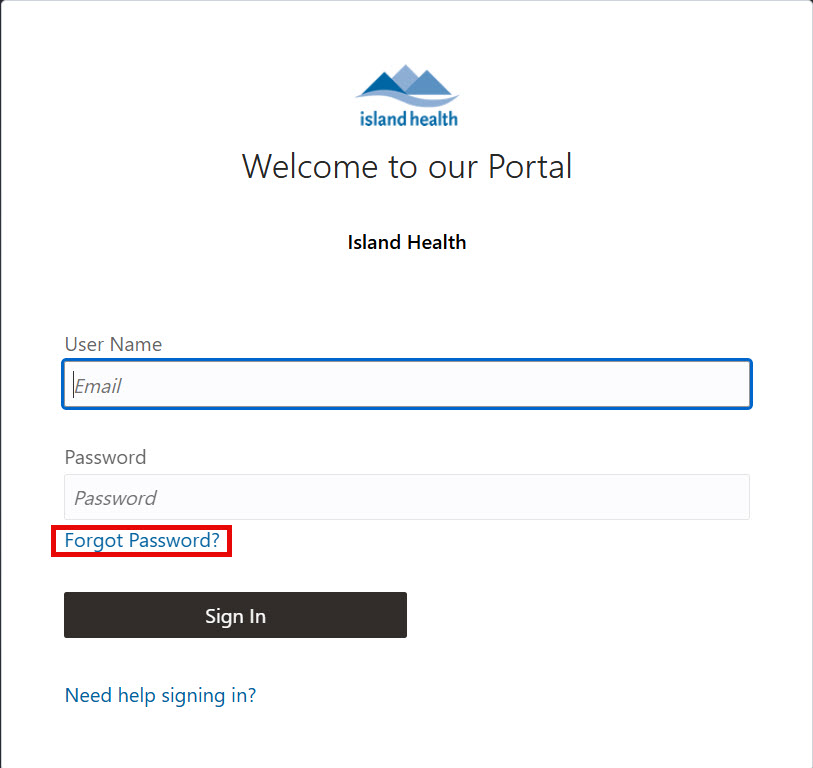
On the next screen, fill in your email address in the field that says, What’s your user name? and click Next:
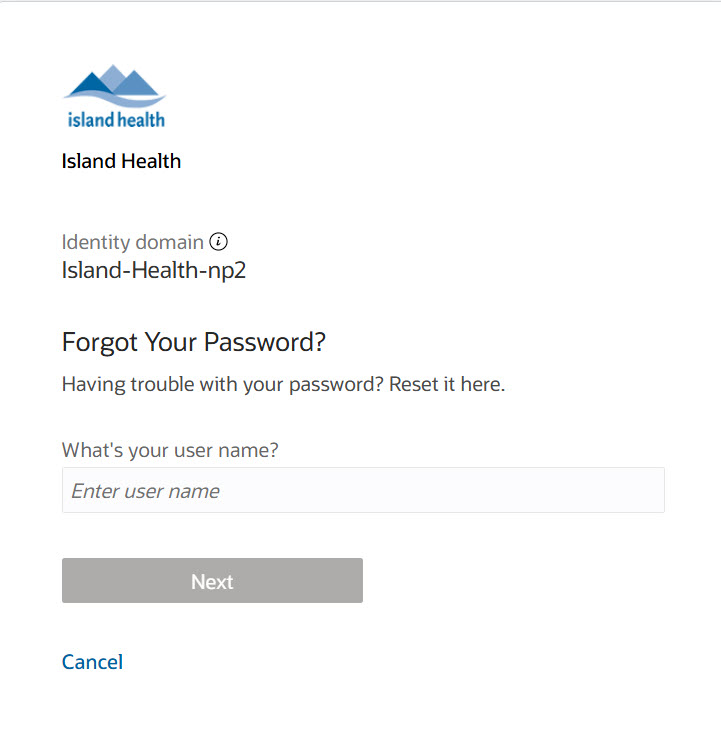
Check your email inbox. You will receive an email that provides a link to the Reset your password screen:
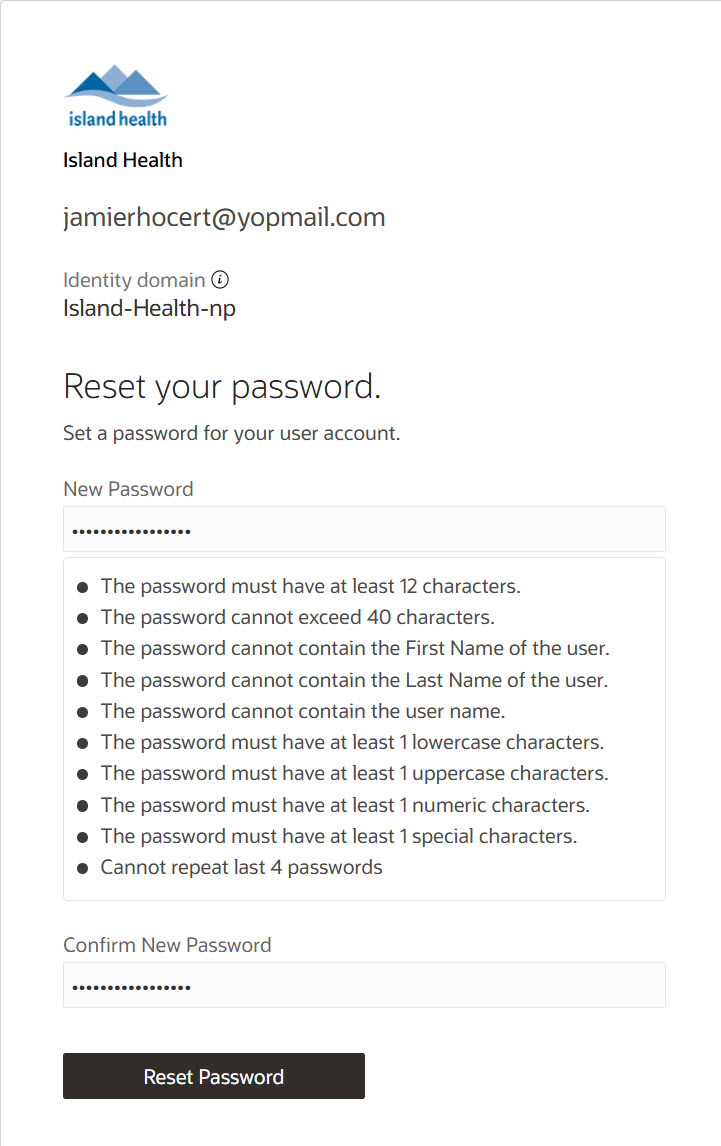
Create a new password. Choose a password that only you will know.Having trouble? Call the MyHealth Technical Helpdesk: 1-800-249-1024 (toll-free).
Appointments
- I can't find or change an appointment
-
MyHealth shows only appointments booked through Island Health’s scheduling system. Some appointments may not appear. You can’t book, cancel or change appointments in MyHealth. Contact the clinic or program that booked your appointment.
- My appointment details don’t match what I was told
-
Call the clinic or hospital where your appointment is scheduled to confirm the time, location or instructions.
For a virtual appointment, MyHealth may show the clinic’s address—not the place you’ll attend from. Follow the instructions the clinic gave you. If you’re unsure where to go, call the clinic.
- I have a virtual appointment
-
MyHealth shows the location of the clinic or program that booked your appointment. It may not show where you need to go or join from.Follow the instructions the clinic gave you when booking. If you’re unsure where to go, call the clinic.
- I need to complete a form before my appointment
-
Your care team may ask you to complete a health form in MyHealth. These forms are called Clipboards.
When you sign in, check your dashboard for a message about a form to complete. Submit it as soon as you can so your care team can review your answers before your appointment.
If you can’t complete the form in time, your care won’t be affected. Your care team can ask you the same questions during your visit. A provider may also contact you to confirm your answers or ask for more information.
Need help using a Clipboard or answering a question? Call the MyHealth Help Desk at 1-800-249-1024. It’s open 24 hours a day, 7 days a week. Staff can direct your question to the right Island Health team.
-
Test results
- I want to know when my results will appear
-
MyHealth may not show every result or report. It only shows information available in Island Health’s electronic health record. Results from provincial screening programs, such as FIT, BC Lung Cancer Screening and BC Mammography Screening, are sent by mail and don’t appear in MyHealth.
MyHealth delays some results to give your provider time to review them:
- Imaging reports appear 4 days after they’re available to your provider.
- Pathology results, such as biopsy results, appear 7 days after they’re available to your provider.
You may still see a result before your provider has discussed it with you. Fetal ultrasound reports may include your baby’s sex.
If you can’t find information in MyHealth, request a copy of your health records or contact your local hospital and ask for Health Records.
- I can’t find a test result or report
-
MyHealth only shows results from tests processed at an Island Health facility. If your sample was sent to an outside lab, the result won’t appear in MyHealth.
For tests processed at Island Health:
- General lab results: Available from 2006 onward.
- Microbiology, pathology and imaging results: Available from January 1, 2019 onward.
- Some imaging reports—including heart, lung and mammography screening reports—may not appear because of technical limitations.
Island Health is working to make more reports available.
- I want to download or print my results and records
-
You can download reports by clicking the “Download” button on the right side of the report box.
Please remember that information viewed or printed from MyHealth represents a point-in-time copy of information available at the time and may not reflect a complete representation of all your results. As your report contains personal medical information, keep any reports in a private and secure location.
You can also add health care appointments to your personal calendar (e.g. Gmail).
- I have a question about my test results at Lab & Medical Imaging
-
- I have a question about Laboratory (lab) results
-
- When will my laboratory results be available in MyHealth?
-
General Laboratory and Microbiology results are available as soon as testing has been completed and results are published in Island Health’s electronic health record (EHR). Testing completion times vary depending on the test type. Pathology results will display seven days after they have been completed and sent to your health-care provider.
- Why can’t I see my results from LifeLabs?
-
MyHealth only provides results on tests performed in Island Health laboratories. Samples sent to external laboratories for testing are not available. Laboratory tests done at private laboratories, such as LifeLabs, are also not available. Please contact your health-care provider for these results.
- Why can’t I see all of my Island Health General laboratory test results?
-
The default display timeframe for General Laboratory is one week back from your most recent result. Change the Start date filter to expand the displayed result timeframe. To view more results for a test, click View all for this result, if available, or the far right arrow.
Note: If you change the date range filters and click on a result to view more details, when you navigate back to the prior page, the date range reverts to the original one-week time frame.
- How will I be able to determine whether my laboratory results are normal?
-
General laboratory tests display your result with Island Health’s normal reference range. If your result is outside of the normal reference range, it will show in orange with an indicated value in brackets (low, high, critical, abnormal). Not all out-of-range results represent disease; please follow up with your health-care provider.
- Why do some of my tests display ‘See CareConnect’ or 'See E-Health Viewer' in the results section?
-
Some specimens are sent to non-Island Health laboratories for testing; these results do not display in MyHealth. To see where the test was referred to, click the far right arrow and then Show More Info.
- How do I find my ‘See CareConnect’ results?
-
Contact your healthcare provider/office/clinic who ordered the test and gave you the lab requisition.
- What is CareConnect?
-
CareConnect, formerly known as E-Health Viewer, is British Columbia's secure, view-only Electronic Health Record (EHR). It offers healthcare providers access to an integrated, provincial view of patient-centric information (e.g. laboratory results) that is available 24/7 to support the delivery of patient care. Access is not available to non-health care providers.
- Why do some of my tests display ‘See Comment’ in the results section?
-
Some tests have additional information available as a comment. To see the comment, click the far right arrow and then Show More Info.
- Pathology reports look different. When and why did the report format change?
-
In January 2023, the report format changed to make reports easier to read and include more details.
- I see an “Addendum” in my Pathology report. What does Addendum mean?
-
An addendum is an update to the original report. Once a report is finalized, authors cannot edit the content within the report; instead additional information can be added in the form of an Addendum, which displays at the top of the report.
- I have a question about Medical Imaging results
-
- When will my Imaging reports be available in MyHealth?
-
Once a report is completed and signed by a radiologist, it will show in your account in a pending status and will be viewable after 96 hours (4 days). This gives health-care providers time to review the report and, if appropriate, contact you prior to the report being available in MyHealth. Imaging tests done at private medical imaging clinics will not be available in MyHealth.
- What do the Imaging abbreviations stand for?
-
- BI = Breast Imaging
- BMD = Bone Mineral Densitometry
- CT = Computed Tomography (CT scan)
- FL = Fluoroscopy
- IR = Interventional Radiology
- MRI = Magnetic Resonance Imaging
- NM = Nuclear Medicine
- US = Ultrasound
- XR = X-Ray
Note: Obstetrical (fetal) ultrasounds may include information that identifies the sex of the baby
- Will Obstetrical (Fetal) Ultrasounds include the baby’s sex?
-
Yes, the baby’s sex will be included in obstetrical ultrasound reports.
If you do not want to know your baby’s sex, please do not look at the report until after you have given birth.
- Why can’t I see my report in MyHealth?
-
Reports only display in MyHealth once they are completed and signed by the radiologist. Once signed, it will show in your account in a pending status and will be viewable after 96 hours (4 days).
- Images were taken on two different body areas. Why do I have two reports that are the same?
-
Occasionally, when imaging is done on two body parts in close proximity, the radiologist will complete one report for both areas, but the report will show up twice in your account. If you have concerns regarding your medical imaging reports please email the myhealth@islandhealth.ca.
- Images were taken on two different body areas – why do I have only one report?
-
Sometimes imaging for two areas can be combined onto one report.
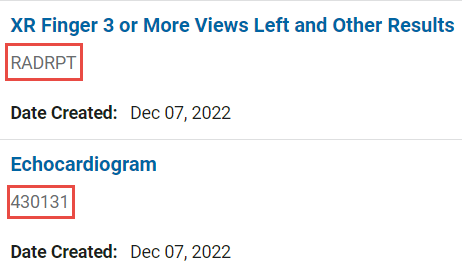
- I noticed there are new characters below the report name. What do they mean?
-
These characters identify the application used by the Radiologist when they created the report. They are reference tags for Island Health office use only.
- Reports look different. When and why did the report format change?
-
In January 2023, the report format changed to make reports easier to read and include more details.
- I see MRN in the header of my reports. What does it mean?
-
A Medical Record Number (MRN) is a unique identifier assigned to your name that is specific to Island Health’s Electronic Health Record.

- I find the report’s font small, making it difficult to read. Is there a way I can make it bigger?
-
Yes, use the Zoom feature at the top of the report.
- I see an “Addendum” in my Medical Imaging report. What does Addendum mean?
-
An addendum is an update to the original report. Once a report is completed, authors cannot edit the content within the report; instead they add additional information in the form of an Addendum, which displays at the top of the report.
-
Clinical documents and records
- I can’t find a clinical document
-
MyHealth shows some documents from your Island Health care. Not all documents are available. Your doctor, nurse practitioner or midwife decides which documents to share.
A document may take up to 8 hours to appear after it’s signed and added to Island Health’s record. It may take longer if your provider adds it after your visit.
Available documents may include clinic, emergency, hospital, operation or procedure notes.
If you can’t find a document, you can [request a copy of your health records], email MyHealth@islandhealth.ca, or call your local hospital and ask for Health Records.
- I can’t open a document
-
If you see “Pending until” with a date and time, wait until then and try again. Documents may take up to 8 hours to appear after they’re signed or updated.
- I need help understanding a document
-
Contact your doctor, nurse practitioner or specialist. For non-emergency health advice, call 8-1-1 or visit HealthLink BC.
- What do the labels on my document mean?
-
- Auth (Verified): The document hasn’t changed since it was completed.
- Modified: Information was added after the document was first completed.
- Addendum: An update to the original document. It appears at the top.
- Reference tags: These are for Island Health staff. You don’t need to do anything with them.
- MRN: Your Island Health medical record number.
- Result Date/Time: When the author started the document.
- I need help with the information in a document
-
The information is wrong
- The information is wrong
-
Email MyHealth@islandhealth.ca or call your local hospital and ask for Health Records.
- The document isn’t mine
-
Contact Health Records right away by email or through your local hospital.
- I can't read it because the font is too small
-
Use the Zoom feature at the top of the report to make the text larger.

- I want to know who will see my document
-
- Will someone with proxy access see my document?
-
Yes. Someone with proxy access can view documents available in your MyHealth account.
- Will my doctor or clinic receive my document?
-
If you identified your family doctor or nurse practitioner when you registered or checked in for care, they’ll receive a copy of documents released to MyHealth. They may not appear in the document’s “copied to” list.
If your doctor or nurse practitioner is listed incorrectly, email MyHealth@islandhealth.ca .
-
Privacy and security
- I have a questions about my health information
-
- Where is MyHealth information stored?
-
Your health information in MyHealth is stored in Canada.
If you call the MyHealth Help Desk, your call is recorded and stored outside Canada. Cerner Corporation, which operates the Help Desk, may collect your name, phone number, email address, date of birth and anything else you choose to share. This information is used to confirm your identity and manage your support call. It is stored outside Canada.
- What information does Island Health collect when I enroll?
-
Island Health collects information to confirm your identity and set up your account. This includes your name, date of birth, sex and Personal Health Number (PHN). Island Health also collects your email address and a challenge question and answer to send your invitation and help you finish setting up your account.
Island Health collects this information under B.C.’s Freedom of Information and Protection of Privacy Act (FIPPA).
- How does Island Health protect my information?
-
Island Health uses reasonable security measures to protect your personal information from unauthorized access, use, sharing or disposal.
- How can I keep my account secure?
-
- Keep your MyHealth username and password private. Don’t share them.
- Avoid using MyHealth on public computers or public networks, such as those at an internet café.
- Use MyHealth where other people can’t see your screen.
- Always select Sign Out when you finish. It’s at the bottom left of the MyHealth menu.
- Keep downloaded or printed health information somewhere private and secure.